Home Office micro zone
The Primary Desk
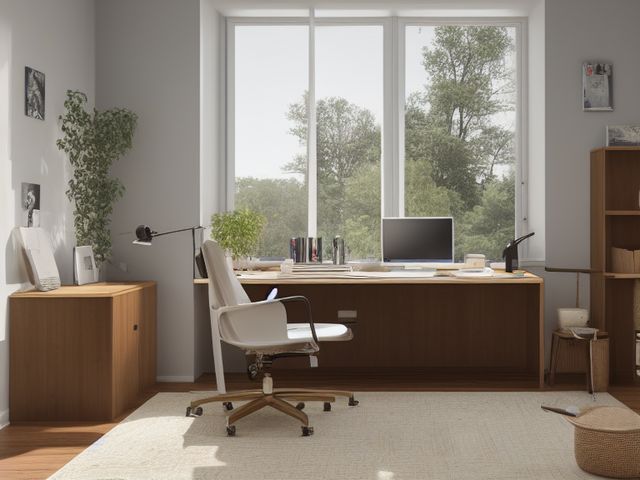
The desk, in the Home Office. One clear surface for the work you are actually doing right now. The monitor, keyboard, and mouse in fixed positions, one notebook, one inbox tray holding fewer than a dozen sheets, no sticky notes on the monitor bezel, and the power strip hooked off the floor so the chair rolls over bare carpet.
One session: 45-75 min, most of it in Sort, because every item you lift off the surface needs a decision before it goes back.
The short version
- Sort. Take everything off the surface and onto the floor
- Straighten. Keyboard square in front of the monitor, notebook on your writing-hand side
- Shine. Power down, wipe the screen with cleaner sprayed onto the microfiber cloth
- Safety. Lift the power strip off the floor onto a hook on the desk leg
- Standardize. Photograph the cleared desk and tape the print inside the top drawer
- Sustain. When you shut the laptop lid at the end of the working day
Each step in full, with what to have on hand and what done looks like, below.
Where it is
Home Office
6 micro zones, one session each
- 1The Primary Desk
- 2The Desk Drawers and Pedestal
- 3The File Storage
- 4The Bookshelf and Reference Zone
- 5The Printer and Scanning Station
- 6The Supply Cabinet
What done looks like
One clear surface for the work you are actually doing right now.
- The monitor, keyboard, and mouse in fixed positions
- One notebook
- One inbox tray holding fewer than a dozen sheets
- No sticky notes on the monitor bezel
+ 1 more on this page
What done looks like
The monitor, keyboard, and mouse in fixed positions, one notebook, one inbox tray holding fewer than a dozen sheets, no sticky notes on the monitor bezel, and the power strip hooked off the floor so the chair rolls over bare carpet.
Common items here
- Monitor, keyboard and mouse, in fixed positions
- One notebook
- One inbox tray, under a dozen sheets
- The power strip, hooked off the floor
Check these before you start
- Water and electricityA mug of coffee sitting behind the keyboard on the same surface as a power strip and a laptop charger. Move drinks to the far side of the mouse, away from cables and the machine.
- FallCharger cables and the power strip lead running across the floor where the chair moves and where you push back to stand.
Which of these is true here?
Match what you are actually seeing in the desk to why it keeps happening, then start at the pass that fixes that, not the top of the list.
I clear the desk and it is covered again by the end of the week
- Paper lands here because there is nowhere else to put it. Confirm in 30 seconds: Ask where one specific item lives. If two people answer differently, or nobody answers, it has no home. If that checks out, start at Straighten.
- The inbox tray is never emptied, only added to. Confirm in 30 seconds: Name the moment it happens. If the answer is "when I get round to it", there is no trigger and it will not survive a bad week. If that checks out, start at Sustain.
- Work from three different jobs shares one surface. Confirm in 30 seconds: Count what you used in the past month. If the honest number is a third of what is stored here, the space is not too small. If that checks out, start at Sort.
I keep losing the note I wrote down
- Notes are written on whatever sheet is nearest. Confirm in 30 seconds: Ask where one specific item lives. If two people answer differently, or nobody answers, it has no home. If that checks out, start at Straighten.
- They go on sticky notes that fall off the bezel. Confirm in 30 seconds: Ask two people in the house to describe this zone when it is finished. Two different answers means there is no standard to keep. If that checks out, start at Standardize.
- There is a notebook but it is not within arm's reach. Confirm in 30 seconds: Fetch it once and count the movements. More than two and the storage is charging you rent every time. If that checks out, start at Straighten.
The chair catches on something every time I move
- The power strip and cables have no fixing, so they lie across the floor. Confirm in 30 seconds: Ask where one specific item lives. If two people answer differently, or nobody answers, it has no home. If that checks out, start at Straighten.
- Boxes are stored under the desk. Confirm in 30 seconds: Stand where you use it and count the steps to where it is kept. More than two is the wrong cabinet. If that checks out, start at Straighten.
- The mat is rucked where the cables cross it. Confirm in 30 seconds: Look for the four: a blade your hand would meet, weight above shoulder height, heat beside something that burns, and an unsafe placement near a child's reach. If that checks out, start at Safety.
Only have 15 minutes? Take everything off the desk except the monitor, keyboard and mouse. Put the loose paper into the inbox tray, give every sheet in it a verdict until it is under a dozen, and hook the power strip up off the floor. Victory: One notebook and one tray under a dozen sheets, and the chair rolls the width of the desk without catching.
The six passes, in order
Work them in this order. Sorting after you have arranged things means arranging things you were about to remove.
This zone's full kit list is below, after the method. Skim it first if you would rather gather everything before you start.
Sort
Decide what stays. Everything else leaves the zone now.
Take everything off the surface and onto the floor, then put back only what the task in front of you needs, plus the inbox tray. The dead pens, the second mug, and the fringe of sticky notes around the screen do not go back up.
What to store it in, now that you know what you are keeping
Bins and shelves are for what Sort left behind, not a stand-in for it. Buying storage before sorting means buying a container for things you have not yet decided to keep.
Only if it applies to the desk: 6 more
Not every home needs these for the desk. Each one is here because some do, and the reason is next to it.
- Pegboard Panel System Create visible tool and supply homes, in the Straighten, Standardize and Sustain passes. Do not overload; anchor wall-mounted or tall systems where required.
- Document File Box ×2 Protect and organize household records, in the Straighten, Standardize and Sustain passes. Do not overload; anchor wall-mounted or tall systems where required.
- Portable Project Tray ×2 Contain one active project and its parts, in the Straighten, Standardize and Sustain passes. Do not overload; anchor wall-mounted or tall systems where required.
- Cable Management Kit Secure and label device cords, in the Straighten, Standardize and Sustain passes. Do not overload; anchor wall-mounted or tall systems where required.
- Charging Dock Create one controlled device charging home, in the Straighten, Standardize and Sustain passes. Do not overload; anchor wall-mounted or tall systems where required.
- Drawer Divider Set Create visible subcategories in shallow drawers, in the Straighten, Standardize and Sustain passes. Do not overload; anchor wall-mounted or tall systems where required.
Straighten
Give what stays a home, placed where the hand actually reaches.
Keyboard square in front of the monitor, notebook on your writing-hand side, phone face down beyond it, and the whole sweep the mouse travels left bare so you are never steering around a stapler.
Shine
Clean it, and use the cleaning to inspect what you cannot see when it is full.
Power down, wipe the screen with cleaner sprayed onto the microfiber cloth, then do the desk edge and the underside lip where your forearms rest, which is the grubbiest part of the whole room.
Surface by surface, all 8 of them, with what to use on each.
Safety
Make the zone safe for everybody who uses it, including the shortest person.
Lift the power strip off the floor onto a hook on the desk leg, and check that no charging cable crosses the arc the chair rolls through. Your feet should find nothing under there.
Standardize
Write down the best way you know today, so it survives you forgetting.
Photograph the cleared desk and tape the print inside the top drawer, so the word clear stops being a matter of opinion in this household.
Sustain
Attach the reset to something that already happens, so it keeps itself.
When you shut the laptop lid at the end of the working day, reset the surface to match the photo before you stand up. Two minutes, and it is yours alone. Next morning is too late, because by then the pile has been there since last night and reads as normal. Slip is the photo comparison plus one number, since an inbox tray holding more than about a dozen sheets has stopped being an inbox. Recovery is the reset, and emptying that tray is a longer job worth booking separately. Familiarity defeats this desk, not volume.
The kit this zone called for
Everything above assumed you had these already. Types of thing, not brands: anything you already own that does the job is the right one to use.
- Screen-safe electronics cleaner Shine, Sustain Spray onto the cloth, never onto the screen or into a vent; power the device down and let it cool first.
- Color-coded microfiber cloth set ×12 Shine Wash by use color; avoid fabric softener.
- Neutral pH multi-surface cleaner Shine, Sustain Verify surface compatibility; lock around children and pets.
- Compact vacuum with attachments Shine Use appropriate attachment.
- Keep, Relocate, Donate, Recycle, Trash container set ×5 Sort Do not block exits.
- Portable cleaning caddy Straighten, Shine, Sustain Secure chemicals from children and pets.
- Portable label maker Standardize, Sustain Follow surface and adhesive guidance.
- Removable write-on labels Standardize Test on delicate finishes.
Only if it applies to the desk: 2 more
- Cord Label Set Standardize, Sustain Install and use according to product instructions.
- Surge Protector with Overload Protection Straighten, Safety Install and use according to product instructions.
The half-finished thing
One corner of the desk is held by a project you have not touched in weeks and cannot put away, because putting it away feels like admitting it is over. Say the next physical action out loud in one sentence. If you can name it ("call the insurer", "sign page four"), it is live: write that sentence on a card, clip it to the papers, and it goes in the inbox tray, not on the desk. If you cannot name a next action, it is not stalled, it is abandoned. Box it, write today's date on the lid, put it on the shelf, and if the box is still unopened on that date next year, it leaves unopened.
Cleaning it properly, surface by surface
Power down first, then clean top to bottom and back to front, screen to floor. The two spots that hold the most grime are the ones you touch most: the screen and the underside lip where your forearms rest all day.
Work down, not across. Whatever comes off a high surface lands on the one below it, so cleaning the floor first means cleaning it twice.
Carry these in with you. Compact vacuum with attachments; Color-coded microfiber cloth set; Neutral pH multi-surface cleaner; Screen-safe electronics cleaner; Portable cleaning caddy.
- The monitor screen and bezel
With the screen off and cool, spray a screen-safe cleaner onto a dry microfiber cloth, never onto the glass, and wipe in one direction so no drips run down into the seam. Use a second dry cloth to buff. Run a dry corner along the bezel groove where dust and skin flakes pack in. - The keyboard and the gaps between the keys
Turn it upside down and give it a shake, then run the vacuum crevice tool along the rows to lift crumbs and hair from between the keys. Wipe the key tops with a barely damp microfiber cloth and neutral pH cleaner, wringing it almost dry so no liquid runs under the keys. - The mouse and its underside
Wipe the body and the wheel with a barely damp cloth, then flip it and clean the sensor window and the feet pads with a dry corner, because built-up fuzz there is what makes the pointer skip. - The task lamp: shade, arm, and base
Only once the bulb is cool, wipe the shade or head, the arm, and the base with a barely damp microfiber cloth. Lift the baked-on dust off the top of the shade where the heat sets it, and keep the cloth clear of the bulb and the switch so no damp reaches the wiring. - The desk top, its front edge, and the underside lip
Clear the surface, spray neutral pH cleaner onto the cloth and wipe the whole top, then do the front edge and reach under to the lip where your forearms rest. That underside is the grubbiest part of the whole room, so give it a firm pass and a dry buff after. - The power strip, cables, and cable tray
With everything still powered down, wipe dust off the top of the strip where it hooks on the desk leg and run a dry cloth down each cable and along the cable tray. Do not wet the strip or the plugs, a dry cloth only around anything electrical. - The chair: seat, armrests, and casters
Vacuum the seat and back with the upholstery tool to lift dust from the weave, wipe the armrests where hands and sleeves land, then tip the chair and pick hair and thread out of each caster by hand so it rolls clean. - The carpet or floor in the arc the chair rolls through
Move the chair aside and vacuum the whole roll zone under and around the desk, getting right into the corner where the strip hooks up. Finish on bare floor with a floor-safe pass if it is sealed.
How to clean anything else in the house, surface by surface.
Inspect as you clean. Cleaning is the only time you see the zone empty, so use it.
- As you handle each cable, look for a charger lead that has frayed or split at the plug end, and flag it.
- Feel the power strip as you dust it and flag a warm body or a browned, discolored socket.
- When you wipe the underside lip, push gently up and side to side and flag any joint or bracket that has started to work loose.
- Check the chair casters as you clear them: one that no longer swivels or a cracked wheel is worth flagging before it seizes mid-roll.
The standard that keeps it fixed
The desk holds the tools of the current task plus one inbox tray, and nothing else stays there overnight.
Reset trigger. When you close the laptop lid for the day.
How much the desk can actually hold
One notebook and one inbox tray holding fewer than a dozen sheets, with the monitor, keyboard and mouse in fixed positions and no sticky notes on the bezel.
If the tray passes a dozen sheets between sittings, the desk is being used as a filing cabinet. The fix is the weekly pass through the tray, not a deeper tray: a tray you cannot empty in one sitting stops being an inbox and becomes a pile with walls. Run the honest count.
When this does not describe your desk
The passes above describe the ordinary case. Plenty of real households are not ordinary, and the fix is not to skip the method, it is to run it against a different starting shape.
- The desk is also the dining table
- Fixed positions cannot survive a table that gets cleared for meals, so the unit becomes a single carry box: monitor riser, notebook and tray go in it and come out together. The dozen-sheet limit still holds, because the box has to close.
- Two monitors or a laptop plus a monitor
- Fixed positions matter more, not less. Set them once and mark the stand feet, because a screen that moves daily drags the keyboard, the mouse and eventually the notebook out of place with it.
The rest of the home office
Each of these is one session on its own.
- The Primary Desk, you are here
- The Desk Drawers and Pedestal
- The File Storage
- The Bookshelf and Reference Zone
- The Printer and Scanning Station
- The Supply Cabinet
The Home Office in full, with what each of the 6 zones is for
The home office as a deck of 66 cards: the frictions people report in each zone, the root cause behind each one, and the timed action that clears it. Free to read or print.
Zones that do the same job, elsewhere in the house
Different room, different name, same real job. Each one is its own page because the room around it changes what actually works.
- The Desk Drawers and Pedestal in the home office
- The Study Desk in the kids bedroom
- The Guest Welcome and Work Surface in the guest bedroom
Related reading
- Charger cables crossing the floor under this desk?
- Before you buy storage for this zone
- Why this zone gets messy again
- Moving three things to get to the one you need?
- Does something in this zone actually get used somewhere else?
Questions people ask about this zone
- How long does it take to reset the desk?
- One session: 45-75 min, most of it in Sort, because every item you lift off the surface needs a decision before it goes back.
- What does a finished desk look like?
- The monitor, keyboard, and mouse in fixed positions, one notebook, one inbox tray holding fewer than a dozen sheets, no sticky notes on the monitor bezel, and the power strip hooked off the floor so the chair rolls over bare carpet.
- What is the hardest call to make in the desk?
- One corner of the desk is held by a project you have not touched in weeks and cannot put away, because putting it away feels like admitting it is over. Say the next physical action out loud in one sentence. If you can name it ("call the insurer", "sign page four"), it is live: write that sentence on a card, clip it to the papers, and it goes in the inbox tray, not on the desk. If you cannot name a next action, it is not stalled, it is abandoned. Box it, write today's date on the lid, put it on the shelf, and if the box is still unopened on that date next year, it leaves unopened.
- How do you keep the desk from getting cluttered again?
- The desk holds the tools of the current task plus one inbox tray, and nothing else stays there overnight. When you close the laptop lid for the day.
- What do you need to clean the desk?
- Compact vacuum with attachments; Color-coded microfiber cloth set; Neutral pH multi-surface cleaner; Screen-safe electronics cleaner; Portable cleaning caddy.
- What do you clean first in the desk?
- The monitor screen and bezel. With the screen off and cool, spray a screen-safe cleaner onto a dry microfiber cloth, never onto the glass, and wipe in one direction so no drips run down into the seam. Use a second dry cloth to buff. Run a dry corner along the bezel groove where dust and skin flakes pack in.
- Is there a water and electricity risk in the desk?
- A mug of coffee sitting behind the keyboard on the same surface as a power strip and a laptop charger. Move drinks to the far side of the mouse, away from cables and the machine.
- Is there a fall risk in the desk?
- Charger cables and the power strip lead running across the floor where the chair moves and where you push back to stand.
- Why does the desk do this: I clear the desk and it is covered again by the end of the week?
- Paper lands here because there is nowhere else to put it, so start at Straighten; The inbox tray is never emptied, only added to, so start at Sustain; Work from three different jobs shares one surface, so start at Sort.
- Why does the desk do this: I keep losing the note I wrote down?
- Notes are written on whatever sheet is nearest, so start at Straighten; They go on sticky notes that fall off the bezel, so start at Standardize; There is a notebook but it is not within arm's reach, so start at Straighten.
- Why does the desk do this: The chair catches on something every time I move?
- The power strip and cables have no fixing, so they lie across the floor, so start at Straighten; Boxes are stored under the desk, so start at Straighten; The mat is rucked where the cables cross it, so start at Safety.
When you want it off the screen
Carry The Primary Desk into the room
The method above is complete and free. The Whole House Print Pack puts The Primary Desk and the other 113 micro zones on 684 printable cards, so the steps you just read are not stuck behind a phone screen while your hands are full.
The Print Pack, 19 dollarsJust this zone, 4 dollarsOr draw a card free
The Primary Desk on its own is 4 dollars for 6 cards. All 114 micro zones is 19 dollars for 684. The whole house is the better buy; the single zone is here so you can take only what you are working on.
If The Primary Desk keeps fighting back, the real problem usually sits somewhere else in the room. A one hour virtual consult is 250 dollars: we find the function, the friction and the root cause together, and you keep a written standard for the space.
See what a consult covers, 250 dollars
Not ready to pay for that either? Ask which zone first, free